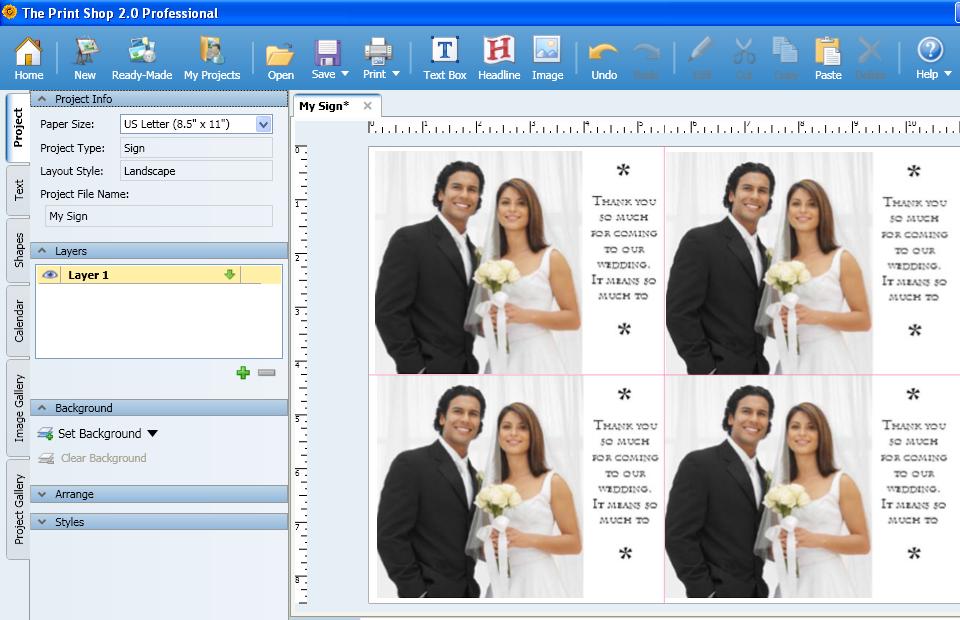
There is no template for 4 on a page, so here is how I get that result with minimal fuss:[ol]
-
Open a new custom postcard project, width 5.5 and height 4.25.
-
Complete your design and save your project as a PrintShop project for future editing.
-
Save As… JPG. Select the highest quality resolution.
-
Open a new blank sign project, landscape orientation.
-
Insert JPG #1 four times and arrange the four copies to fill the page.
-
In the print setup, make the margins as small as your printer allows.
[/ol]You are ready to print the postcard fronts.In another sign project, insert JPG #2. (N/A if the back of your postcard is blank.) Arrange four copies as you did before. You are ready to print on the back of your paper stock.
[image]local://upfiles/72/B67025E136914952BB3FB81200E3F072.jpg[/image]
I added guides to help resize and arrange my images.