i have the german print shop 21 deluxe - and i try and try and try to get a frame/border around a poster…
if i try the “border-plus-proggie”, i find nice side-parts, but no fitting corners…
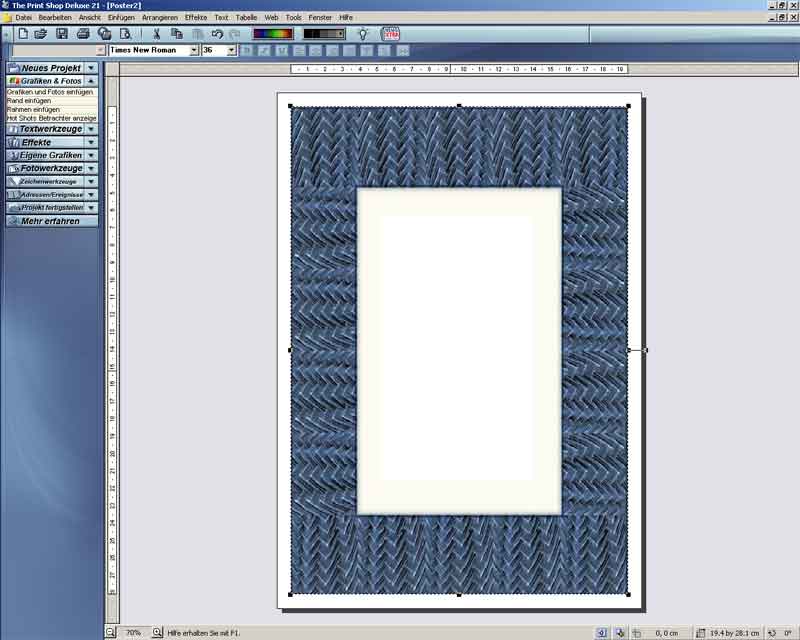
if i try the frame - hope this is the right english word for it… - i can resize it to the whole document, but then the
wide/strength/thickness of the frame is much toooo big…
i loose about a quarter of the layout-size with an oversized frame…
and i can find no way to resize/scale that graphic down…
i just want a small, narrow border/frame around a poster - is that not possible…!!!
thanx- but when i use them, and resize them to fit the whole document/poster - it looks like above…
this blue frame was pretty (and narrow - but it scales to that wide… - and so it is unusable…
id need a way, to scale a frame to poster-size - but the thickness of the frame should stay small... - as it already was in the good old old print shop deluxe.... there it worked, resize the frame but the bitmap stay in its narrow size…
The thickness stays proportional, not the same size when small. You must choose a frame that is thin compared to the empty space within the frame. I saw a few “thin frames” like that. Also look in the Arts and Photos Gallery for even more borders and frames (rather than just the Frames Gallery).
You can take any of the “thick” frames that are vector graphics and export them as high res JPGs. Import the JPG and crop it with the photo editor tools. I have to leave for work soon, so when I get back, I can make a sample screenshot and upload it.
thats too bad - at the old print shop the frames where - i dont know, vector-grafix or so - there you could change the framesize, without effecting the thickness/form of the frame itself…
i really appreciate your help, you dont have to waste time for me to make a workaround, i understood how you mean - i will try it that way, but its really too bad, that the new print shop can`t scale a frame/border like his grandfather already did…
seems, its just a bitmap - and when you scale it bigger, also the bitmap becomes bigger - very “nice”…
The easiest thing to do is to simply layer your photo over the frame, covering up parts of it so that the frame appears thin. No editing or fussing required!
ps: yes - the old old (from 1992 i guess) print shop deluxe was really nice,
not that mighty as todays software, but handy to do all youd needed unfortun its not running stable under xp anymore…
 - i can resize it to the whole document, but then the
 narrow - but it scales to that wide… - and so it is unusable…


