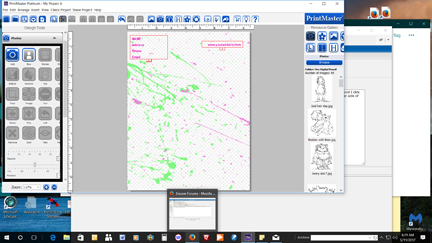
I just downloaded Printmaster Platinum version 7. On the main screen I can not see all of the icons on the Design Tools area as there is a border surrounding it that obscures part of some of them. On the other side of the screen the icons for the Resource Gallery are also partially hidden. I have the screen as wide as it will go and can find no way to change the size of these fields or eliminate the border. Any help? I am using Windows 10 which the Broderbund sales page for this version of Printmaster said it would work with.
Do you have your screen view set higher than 100%?
I did but I went and changed it to far below 100% and it still looks the same. Neither of these conditions exist when I first open Printmaster but the second I click on the Design Tools toolbar the frame pops up around it and obscures part of the toolbar and the Resource toolbar becomes partially hidden on the other side of the screen (the icons on the right of the toolbars) [image][/image] ( I just tried to upload a picture of the screen but it does not appear to have worked. I clicked on “image” at top of screen then clicked on embed picture then uploaded a picture but nothing is appearing. Not sure how to do that.) (By the way, I am fairly computer savey. I am not new to the game.)
Could the fact that I still have my old Printmast program still on my computer have any effect on the situation? (Loved it, by the way..not too sure yet about this new version)
[image]local://upfiles/27671/040FFA7006DF4C3D9381048182E681E7.jpg[/image]
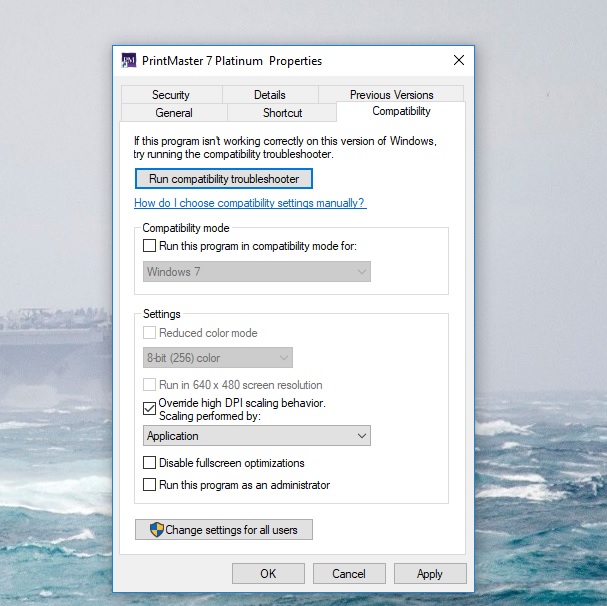
You must have an Intel integrated chip for your graphics card. It happens on my personal laptop. Just right click the desktop shortcut icon and select properties. Click the compatibility tab and disable High DPI Scaling. Your image may differ slightly than mine if you don’t have the Windows Creators Update, but still functions in the same manner.
[image]local://upfiles/5151/820369E50978454EB112D0DD929AC9FD.jpg[/image]
I think it worked…so far so good. Thanks, I really appreciate your help. I was not too enthusiastic about my new Printmaster but now I am having fun with it.
Diane
You are welcome  Happy to hear it worked out.