I am having trouble printing. When you select print you should get a box that lets you select a printer and some parameters of that printer, All I get is an error message that says the “settings to access a certain printer are not valid” and the printer selection box does not open. I tried reinstalling the program but nothing works. Help
The first step on Windows 10 is to type in the box Printers and Scanners as put shown in this picture.
[image]local://upfiles/5151/DA87411196C04DE2BDF5368F242B84C4.jpg[/image]
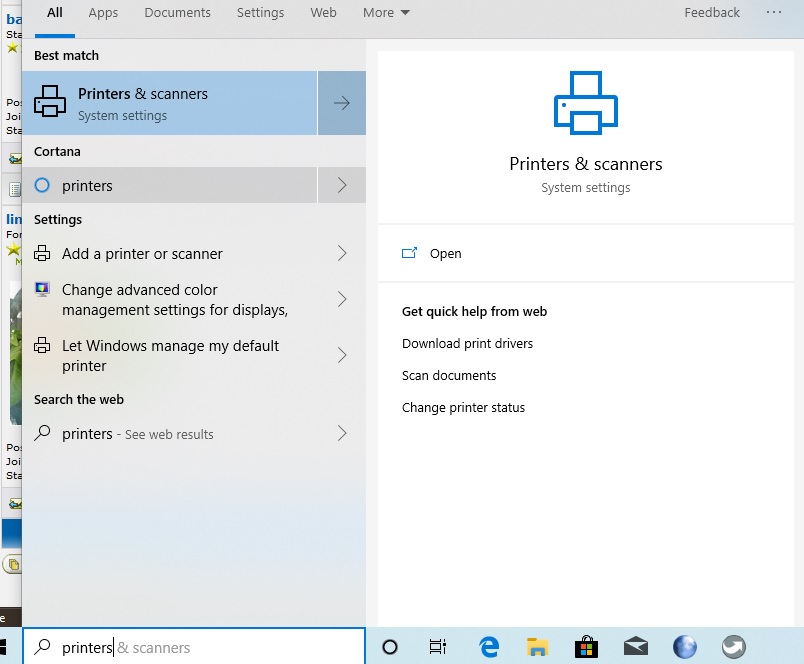
Click Printers and Scanners.
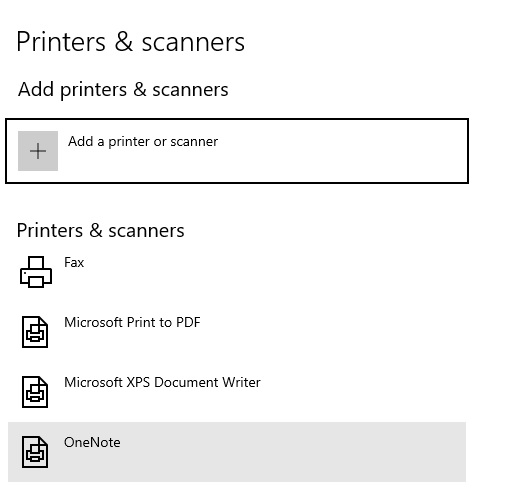
Remove One Note, XPS Writer and Fax.
Close down Print Shop and then restart it.
The problem should go away.
[image]local://upfiles/5151/65CC9BD88023479AACC1E5B1CDB3B724.jpg[/image]
I only saw this bug in The Print Shop 4.0 and 4.01
It supposedly does not happen anymore in 5.0
If it does, I’ll make sure we get this reported to the developers.