I’ve created a calendar with banner events splitting over May and June and I want to be able to print from May 15th - June 15th. When I go to select the begin date I’m able to select 5/15/2016 but as soon as I select the end date it changes the start date back to 5/1/2016. Can someone provide me the steps to correct this? I will need to print calendars that span multiple months instead of just printing May, June etc. Thanks for your help with this matter.
Can you tell us what Calendar Creator “View” you are using? If you are using a simple month view, for example, you should be able to specify a start date and end date (or period) in the print dialogue, and the printing would start and end based on the entry, and the Print Preview will also reflect the range. Maybe I’m unclear on what you meant by calendars spanning multiple months, since Calendar Creator will print any range you specify.
I’m using a simple month view and that is exactly what I’m trying to do and it’s not allowing me to select the date range desired. I expected the print preview to show me the date range I had selected but when I enter the end date the start date flips back to the beginning of the may say I’m trying to print from May 15, 2016 to June 2016 I’m able to modify the start date but as soon as I click in the end date field the start date reverts back to 5/1/2016.
As you can see with the screen shot as soon as I select the end date the start date goes back to 5/1/2016.
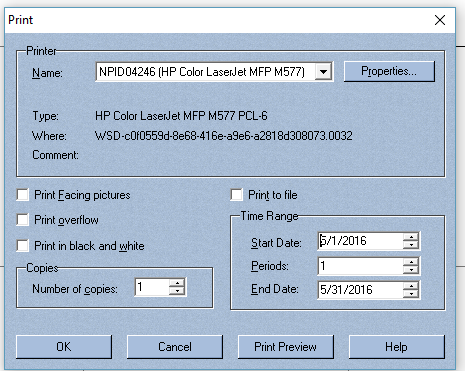
Your screen shot is showing just what I’d expect, with a start date of 5/1 and end date of 5/31. At this point, clicking the arrows beside the end date should advance or reverse the date. Typing the date should also work. Do you get an error when trying to change the dates?
I’ve tried both using the arrows to advance the start and end date or I’ve just typed the dates and when ever I click of the start date to the end date field it reverts back to say 5/1/2016 or the 1st of any month I’m trying to print. I’m on Windows 10. I’ve un-installed and re-installed and still it is not working.
I now see what may be going on. Since you are printing a month view, the calendar has no choice but to print the 1st of the month, so it seems to insist on that. If you choose a multi-week view, there may be flexibility on the start date. You should have no problem entering an End date within the next month. And like the start date, no matter what end date you choose, it will print the full month page.
As David indicated,
[ul]
-
All month view calendars print from the first day of the month to the last day of the month.
-
All weekly planner calendars print from the first day (Sunday) of the week to the last day (Saturday) of the week.
[/ul]
In either case, change the Periods in the Time Range, to include the period you want printed. You will always get a few days more because the program will not start nor end printing in the middle of a week.This is the multi-week view (period 1):
[image]local://upfiles/9017/E0CE63069EC445B4A11373F5C320F1D1.jpg[/image]

This is the weekly planner view:
(May 15 would be period 1 of 5; shown is period 5 of 5. You would be printing 5 pages.)
[image]local://upfiles/9017/2AE7ED12CE4E4DA9B71D5FCF2B35B87C.jpg[/image]
