I downloaded a paper pack that is not installing onto my computer. It should integrate into the Print Master program.
I have Print Master Platinum 5.0. The file that I cannot get to install is created by Story Rock and is called Candied-Hard Candy.
This is the link to the pack I cannot get to install https://www.printmasterpacks.com/store/display_product_page?id=SRHD-CP-0513-32864
Sign into your printmaster packs account and go to My Downloads. Find your product. Click the Windows or Mac link.
If this is what you already did, the files will have been installed to the proper PrintMaster folders and you will find the files when you browse through the Clip Art gallery. The files will be in different locations based on whether they are backgrounds or embellishments.
Personally, I like to do the General download so I can organize the files in my own scrapbooking supplies folder. Then I can always bring them into PrintMaster (just as I would a photo) or any other graphics program I choose to use.
BTW, check out Printmaster Packs Free Clip Art. Hundreds of scrapbooking graphics including professionally designed quick pages. See my webpage for some examples: http://ellengard.weebly.com/scrapbooking.html
ellengard----Thank you for your reply. Yes, I have downloaded it in the Windows version. But, when I try to “run” the program so that it integrates into the PrintMaster
Program it says it cannot find a compatible program. Strange. I think this file must have a glitch or something.
Another question. I am wanting to make a family cookbook just for some family members. Is it legal to use these downloaded packs of paper, clip art, etc.
for use in a family cookbook? It’s not one to sale, but just one for my family members. I read the terms of use on the site, but it seems to contradict itself…or I am just not brilliant
enough to understand. haha
Your webpage is nice. Thanks again for your response!
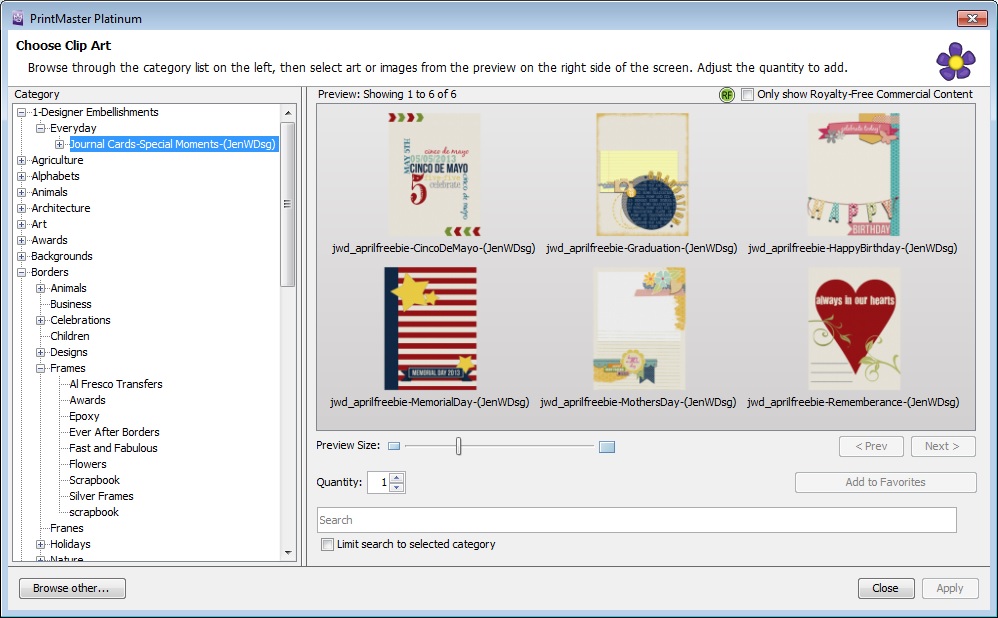
You don’t “run” anything. Just open PrintMaster, start a new project, then click the Clip Art button. You will find the Hard Candy papers and embellishments “mixed in” with all the other PrintMaster clip art.
All the artwork is for personal use so yes, you may use them in your cookbook project that will be printed as gifts for family.
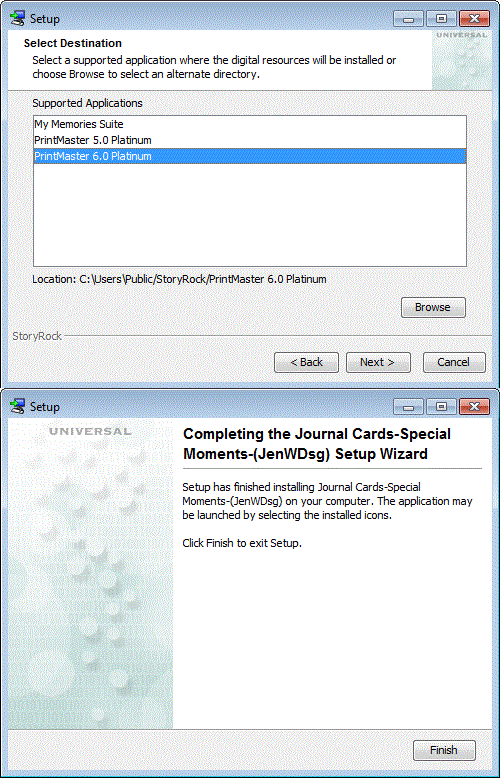
I clicked the Windows link for Journal Cards-Special Moments by Jen Wright Designs and received an EXE file. When I double-click it, the Setup Window opens and I choose my PrintMaster program from the list of Supported Applications.
If PrintMaster does not appear, then you must Browse to the location on your hard drive where it is stored. See my screen capture for Location path.
Now the graphics will be installed to where you can select them from the Clip Art Gallery in the PrintMaster program.
Thank you. I finally think I got it to install that particular pack by finding the program on my own. The other files I downloaded just seemed to integrate into the program on their own. This one was more complicated. Thanks
We don’t generally delete topics if they don’t break the rules. We can lock this topic if you wish if you don’t want anymore replies on it. We leave up threads however in case another user is in a situation you had with the install of the expansion packs so it can be helpful to them.
Ok. The reason I asked is because after contacting Printmaster support they figured out that there was a problem with that download, but have since said they fixed it.